Git Plugin 관리자 vundle 및 vimawesome
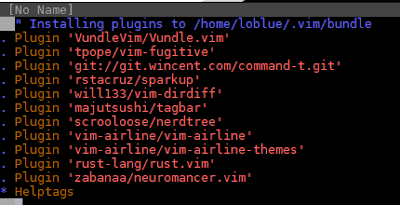
Situation 오래되고 구닥다리같은 vim 편집기도 사실 많은 발전을 이뤄서 사용하기 좋아졌습니다. 그렇다고 vim 사용이 쉽다는건 아니지만, plugin 설치가 쉬워졌고 또 유용한 plugin을 많이 경험해 볼 수 있습니다. Task 사용하기 편리한 vim 플러그인 매니저 vundle 설치 vimawesome 에서 플러그인 검색 및 설치 Action vundle 설치 vundle 설정 다음의 명령으로 vundle을 설정합니다. git clone https://github.com/VundleVim/Vundle.vim.git ~/.vim/bundle/Vundle.vim vimrc 설정 .vimrc 파일 최상단에 다음의 설정을 붙여넣기 합니다. set nocompatible " be iMproved, required filetype off " required " set the runtime path to include Vundle and initialize set rtp+=~/.vim/bundle/Vundle.vim call vundle#begin() " alternatively, pass a path where Vundle should install plugins "call vundle#begin('~/some/path/here') " let Vundle manage Vundle, required Plugin 'VundleVim/Vundle.vim' " The following are examples of different formats supported. " Keep Plugin commands between vundle#begin/end. " plugin on GitHub repo Plugin 'tpope/vim-fugitive' " plugin from http:/...