글

라벨이 bluetooth인 게시물 표시

[의식의 흐름] 라즈베리파이 3 Model B에서 구글 어시스턴트를 이용해보자 #1

Today I Learned를 이용해서 정리해볼까 했는데 성격상 깔끔하게 정리하는건 불가능하고, 그냥 의식의 흐름대로 휘갈겨보기로 했습니다. 이미 몇번 포스팅을 하긴 했지만 이번부터 #1로 시작하기로 했습니다. 라즈베리파이 Wifi와 Bluetooth를 동시에 Raspberry Pi 3 Model B 를 사용중인데 지난번 블루투스 설정을 잘 한것 같은데 금방 끊기는 현상이 발생해서 맨붕했었습니다. wifi를 끄니까 아주 잘 되더라구요! 이 문제를 해결하려합니다.  Fix Raspberry Pi 3 Bluetooth Issues https://www.pi-supply.com/make/fix-raspberry-pi-3-bluetooth-issues/ 검색하다보니 이런 문제가 있다고.. Now at this point, many guides I read stated that a quick reboot and then Bluetooth would be working and accessible through Bluetooth Manager in Menu -> Preferences -> Bluetooth Manager, but I found that whilst this was an option, selecting Bluetooth Manager did absolutely nothing. After an hour or so of frustrated searches online, I stumbled across a page that stated “this happens because when Raspbian installs Blueman and the other Bluetooth software, it does not automatically add ordinary users to the “bluetooth” group. This group gives users permissions to acc...
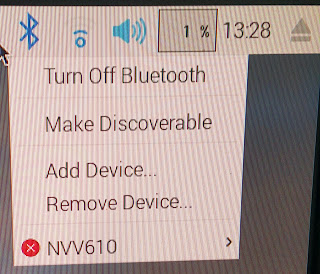
Raspberry pi 에 블루투스 연결하기

이미지
console로 어떻게 해보려고 했습니다만... 역시 GUI란 좋은것이죠. PC와 다름 없네요. Bluetooth speaker를 찾기모드로 켜놓고 Add Device를 선택하면 리스트에 나타납니다. 그리고 추가하면 끝! 이 링크가 가장 설명이 잘 된것 같은데... http://plugable.com/2016/03/14/listening-to-bluetooth-audio-on-your-raspberry-pi-3-pi-2-or-pi-zero/ 저기 빨간색 x표시가 이상해서 찾아보니 연결안된겁니다. 재연결해보니 아래와 같은 메시지가 발생하네요. Connection failed - GDBus.Error:org.bluez.Error.Failed: No such file or directory. Try to connect manually. 에러가 발생하면 아래 명령을 하라네요. 그러니 되긴한데 이거 매번 해줘야하려나요? 나중에 생각하기로 하고 계속 진행 pulseaudio --start 이번엔 9번에서 아무리 해도 Output에 Bluetooth가 나오지 않아 개삽질.. Configuration tab and selecting Off for bcm2835 ALSA 꼭 Off하자! 이래저래 여러번 리부팅도 하고 어떻게 하다보니 성공! 했지만 재생 중간에 작동 불능 상태가 계속 발생... 뭘까...파워가 부족한가 해서 해상도를 낮춰봤지만 동일 증상 발생 허접한 블루투스때문인가 해서 LG 넥밴드형 HBS-810으로 재시도 얘는 소리가 아예 안나네... ps 해보니 pulseaudio는 살아있고 /var/log/syslog 를 살펴보니..이게 뭐지? 구글 검색 Bluetooth: hci0 command 0x0c2d tx timeout 결국 알아냈다! wifi와 bluetooth를 같이 쓰니까 이러는구나... 왓더... 두가지 동시 쓰...

ubuntu 16.04 bluetooth mouse problem

Sometime disconect bluetooth mouse with below kernel logs [511823.372861] hid-generic 0005:045E:07A2.001F: unknown main item tag 0x0 [511823.373033] input: Microsoft Sculpt Comfort Mouse as /devices/pci0000:00/0000:00:14.0/usb3/3-1/3-1:1.0/bluetooth/hci1/hci1:71/0005:045E:07A2.001F/input/input45 [511823.373832] hid-generic 0005:045E:07A2.001F: input,hidraw0: BLUETOOTH HID v1.29 Mouse [Microsoft Sculpt Comfort Mouse] on 00:1a:7d:da:71:13 So I found a solution from stackexchange reference : http://unix.stackexchange.com/questions/177998/bluetooth-mouse-disconnects I just do the first solution on my ubuntu 16.04 uname -a Linux deskop 4.4.0-36-generic #55-Ubuntu SMP Thu Aug 11 18:01:55 UTC 2016 x86_64 x86_64 x86_64 GNU/Linux sjpark:/home2/sjpark/work/alpha/Alpha$ sudo vi /etc/bluetooth/input.conf [sudo] password for sjpark: sjpark:/home2/sjpark/work/alpha/Alpha$ sudo /etc/init.d/bluetooth restart [ ok ] Restarting bluetooth (via systemctl): bluetooth.service. ...

이 블로그의 인기 게시물

구글 시트에 여러 행 한번에 추가하기

WSL2 Ubuntu 20.04 및 네트워크 설정

우분투 terminator 에서 파일 경로 클릭시 vscode 에서 열기